Your body is the controller.
Prop up your iPhone, step back into view, and turn real movement into a fitness game.
Body tracking runs on your iPhone. Camera video is never recorded, stored, or uploaded.

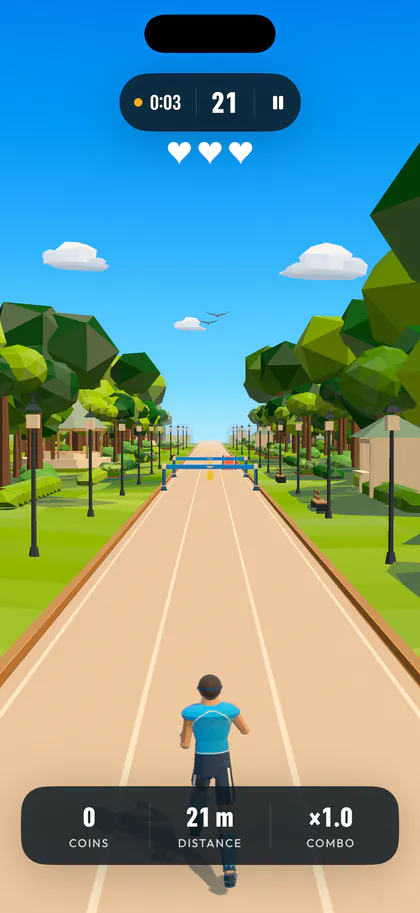
Made for your living room
No controller to hold. Just you, a clear play area, and a run through a bright three-lane world.
-
Step 1. Prop it up
Place the phone upright, facing you.
-
Step 2. Step back
Step 2–3 meters back, facing the camera, with your head, shoulders, hips and both feet visible. Dashfit tells you when you are framed.
-
Step 3. Move to play
Jog in place to move the runner forward.
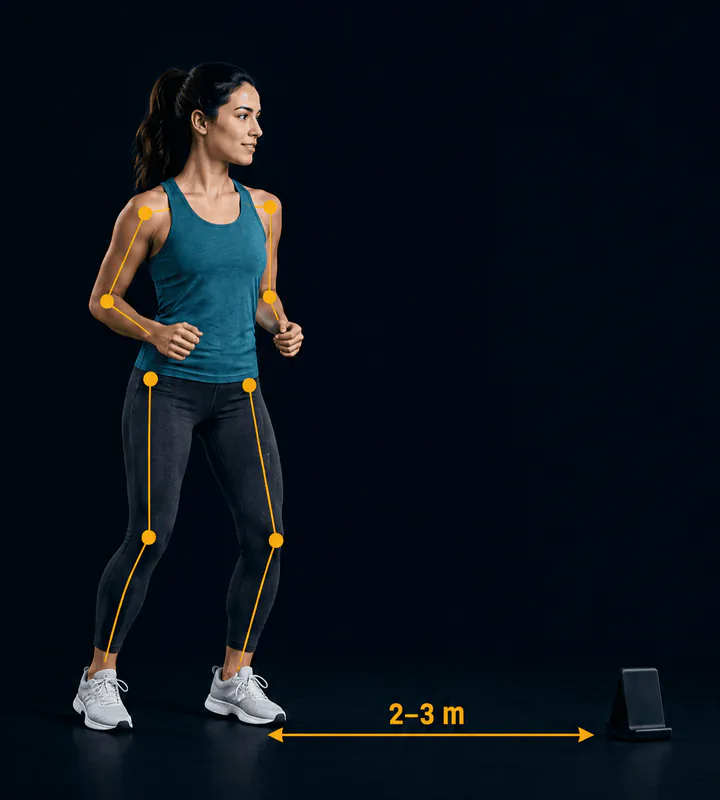 Illustration of the setup.
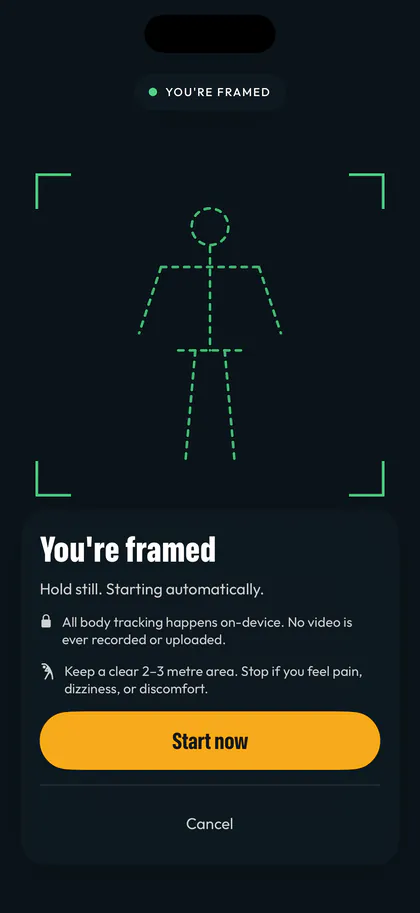
Your body controls the run.
Step or lean left and right to change lanes, jump over hurdles, and squat under barriers. Jog in place to move the runner forward.
- Jog in place
- Keeps the runner moving.
- Step left or right
- Changes lanes.
- Jump
- Clears hurdles.
- Squat
- Moves under barriers.
Three lives per run, so one missed move never ends your session.
Start gently, with a no-jump option.
A plan, not just a game
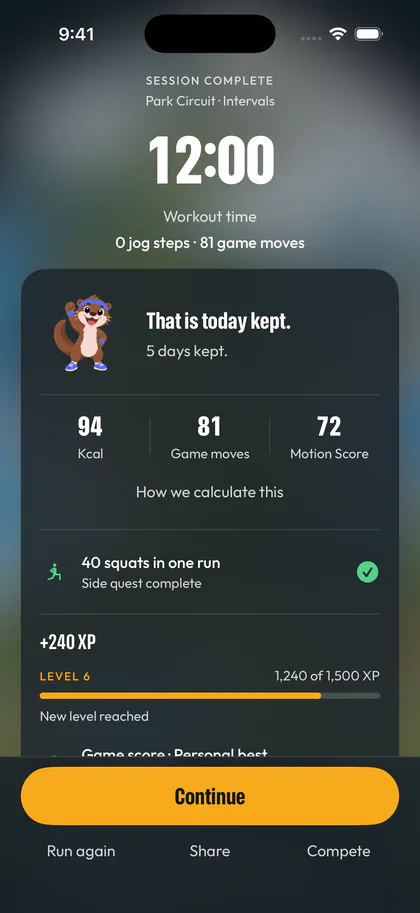
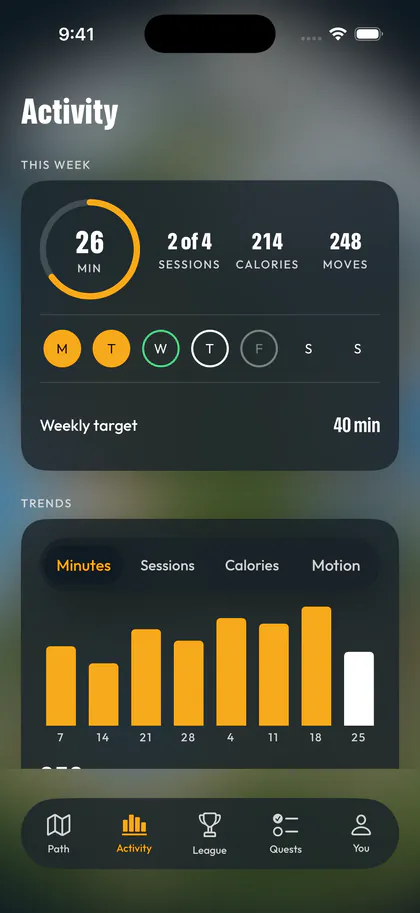
Your four-week Foundation plan becomes a route across an island. Choose a session length, set three to five training days a week, and follow a mix of intervals, steady runs, power sessions, and recovery days.
Start today’s session from the Path, with rounds and rest built in.
Choose a lighter version when you want a shorter workout.
Open a course for a Free run.
After a run, see your movement counts, distance, cadence, and estimated calories.
The Quests tab tracks daily movement goals and your weekly sessions.
Real exercise. More enjoyment.
In a study of 20 young adults, a fitness game delivered high-intensity exercise. Participants rated it more enjoyable and motivating than a conventional interval workout.
Martin-Niedecken et al., Frontiers in Computer Science, 2020
The study tested a different fitness game, not Dashfit.
Eight courses across four worlds
Morning Loop and Park Circuit are open from your first session. The rest unlock as you level up.
 Morning Loop
Garden City
An easy lap to wake the legs up.
Level 1
 Park Circuit
Garden City
The classic Garden City run.
Level 1
 Boardwalk Dash
Sunlit Coast
Standard pace with more air time.
Level 2
 Dune Sprint
Sunlit Coast
Low beams keep you dropping into squats.
Level 4
 City Loop
Skyline District
Weave the promenade between the planters.
Level 4
 Ridge Run
Highland Park
Dense rows, thin air, no coasting.
Level 6
 Skyline Sprint
Skyline District
Opens fast and never lets the pace drop.
Level 8
 Summit Push
Highland Park
Almost every row asks for a jump or a squat.
Level 9
Runner styles unlock as you level up, too.
The camera sees movement. The video never leaves your iPhone.
On device
Movement processing
Never saved
Camera video
Apple’s Vision technology processes camera frames on-device. Camera video and body-pose data are never recorded, stored, or uploaded. Dashfit has no advertising and requires no Dashfit account. Anonymous usage, workout and diagnostic statistics help improve the app; camera video, body-pose data and Apple Health records are never included.
Optional, and never required to play
-
Game Center
Connect Game Center to see weekly competition, all-time scores and distance, and friends and global standings in League, and to earn Game Center achievements as you play. Game Center is optional.
-
Apple Health
After a completed workout, you can choose to save Fitness Gaming workouts and estimated active energy to Apple Health. With permission, Dashfit can read your body-weight history and save weight entries you log. Health access is optional and never blocks play.
One membership, everything included
One Dashfit Pro membership unlocks access to the app. More courses and colourways open as your gameplay earns levels.
-
Annual
$59.99
per year, with a 7-day free trial for eligible subscribers
-
Monthly
$9.99
per month
-
Lifetime
$129.99
One payment. No renewal.
Subscriptions auto-renew until canceled in your App Store settings at least 24 hours before the current period ends. A free trial converts to a paid subscription unless canceled at least 24 hours before the trial ends. You can cancel at any point from Settings on your Apple ID. Prices are shown in U.S. dollars and may vary by region.
Questions
What is Dashfit?
Dashfit is a fitness game for iPhone that you control with your body. Prop up your phone, step back, and step, jump, and squat to steer a runner through short workouts.
Do I need any equipment?
No wearable or handheld controller is required. You need an iPhone running iOS 17 or later, something to prop it upright, and a clear 2–3 meter area.
Is my camera video recorded?
No. Apple’s Vision technology processes camera frames on-device, and camera video and body-pose data are never recorded, stored, or uploaded. Anonymous usage, workout and diagnostic statistics help improve the app; camera video, body-pose data and Apple Health records are never included.
How much does Dashfit cost?
Dashfit is free to download and requires a Dashfit Pro membership to play. Choose $9.99 per month, $59.99 per year with a 7-day free trial for eligible subscribers, or a one-time $129.99 lifetime unlock. Prices may vary by region.
How do I cancel?
Subscriptions are managed by Apple. You can cancel at any point from Settings on your Apple ID, at least 24 hours before the current period ends.
Can I play without jumping?
Yes. Dashfit has a no-jump option that removes jumps from your workouts.
Do I need Game Center or Apple Health?
No. Both are optional and neither is required to play.
When can I download it?
Dashfit is coming soon to the App Store for iPhone. It is not available to download yet.
Clear the floor. Own the lane.
Requires an iPhone running iOS 17 or later, camera access for motion-controlled gameplay, and Dashfit Pro access. Place the phone upright facing you, step back about 2–3 meters, and leave enough clear space to move safely. Stop if you feel pain, dizziness, or discomfort. Calorie figures are estimates. Dashfit is a fitness game, not medical advice.